


|
AUGUST 2026 · ~7 MIN READ · .NET · AGENTIC AI Who Picks the Next Step – You or the LLM?I built two agent apps in .NET before I understood they weren’t the same thing. This is what I learned – and how you can build either one without rebuilding halfway through. |
|
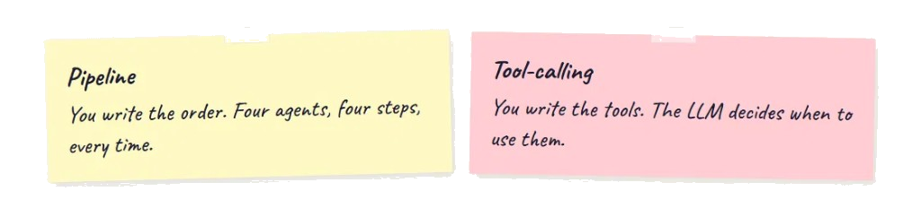
Key takeaway Before you pick Semantic Kernel or roll your own pipeline, answer one question: who picks the next step – your code or the LLM? Known stages and fixed order → you own the flow (pipeline). Open-ended user messages → the model picks tools (Semantic Kernel). I learned that the hard way by building both. |
|
It started with a simple goal: I wanted an AI that could take a rough product idea and turn it into something useful – requirements, architecture, a code plan, a review. The kind of output a small software team might produce over a week, but in minutes. |
I didn’t start by picking a framework. I started by asking: who decides what happens next?
That question turned out to matter more than the model, the hosting, or the UI. I only wish I’d written it down before I shipped the first app – because I ended up building twice.
How I decide now (before opening Visual Studio)
After building both apps, I sketch the same four questions. Your answers point you to one pattern – not both.
Neither column is “better.” They answer different product questions. The expensive mistake is picking SK vs plain C# before you know who’s holding the baton.
The first build: I became the conductor |
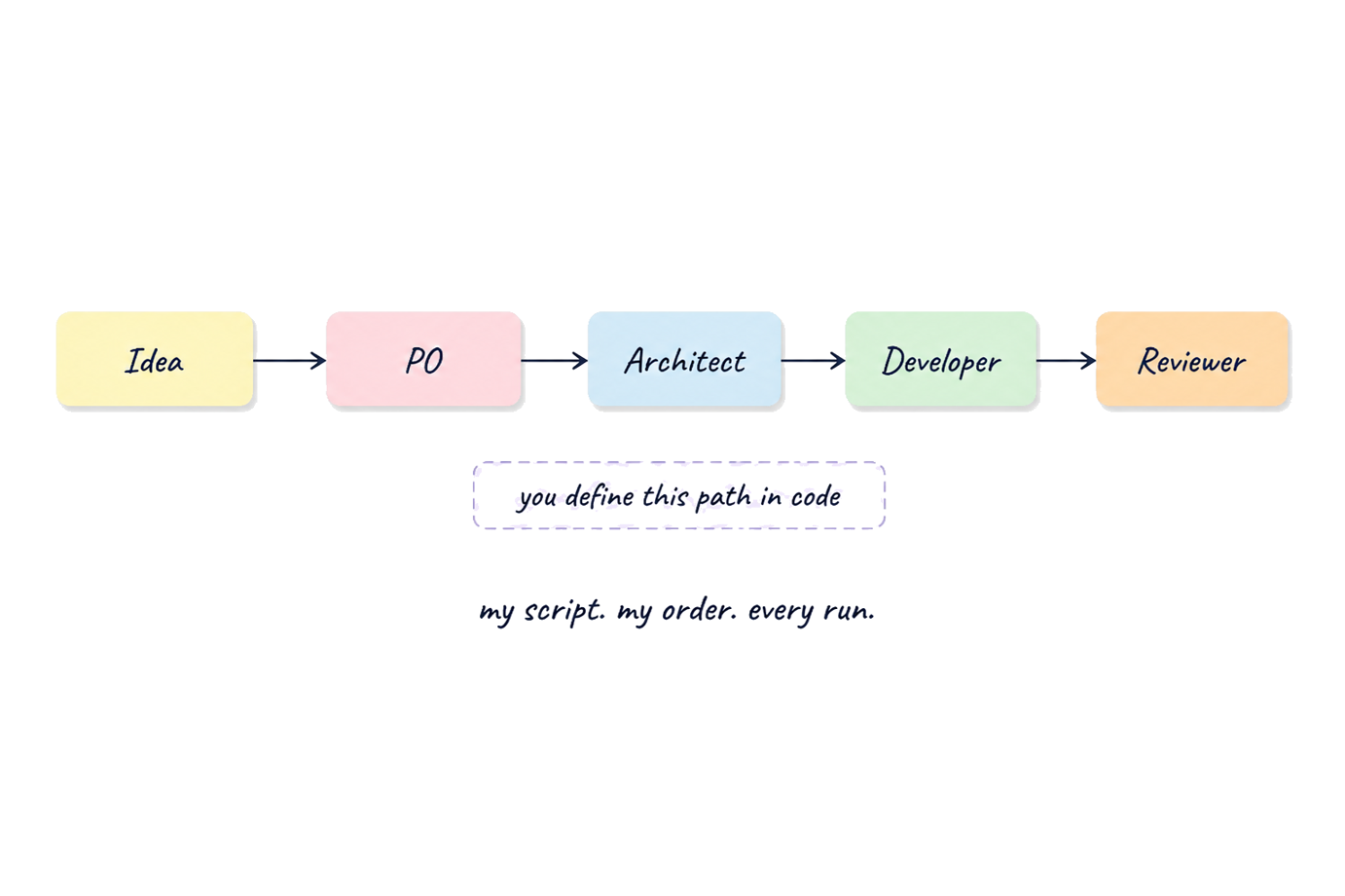
For the pipeline app, I mapped out the work the way a real team would. Product Owner first. Then Architect. Then Developer. Then Reviewer. The order wasn’t negotiable – requirements before design, design before code, code before review.
|
Pipeline mental model: Product Owner → Architect → Developer → Reviewer. Fixed order. You own the choreography. |
Each agent became a C# class with a role and a prompt. They share a base that handles the LLM call and pushes status to the browser through SignalR:
| BaseAgent.cs – the pattern every agent shares |
| protected async Task<string> Execute(string prompt) { await _logger.Log($”🤖 {_name}: Thinking…”); var result = await _ai.Ask(prompt); await _logger.Log($”✅ {_name}: Done”); return result; } |
The Product Owner agent wraps your idea in instructions and sends it to the model. The Architect gets the requirements. The Developer gets the architecture. Nobody sees the full picture – just the handoff from the agent before them.
Then I wired them together. If you’re building a pipeline agent, this is where you live:
| OpenAIWorkflowEngine.cs |
| public async Task<WorkflowResult> RunAsync(string idea) { var po = new ProductOwnerAgent(_ai, _logger); var arch = new ArchitectAgent(_ai, _logger); var dev = new DeveloperAgent(_ai, _logger); var rev = new ReviewerAgent(_ai, _logger);var req = await po.Run(idea); var architecture = await arch.Run(req); var code = await dev.Run(architecture); var review = await rev.Run(code);return new WorkflowResult { Requirements = req, Architecture = architecture, Code = code, Review = review }; } |
Early on I chained the agents with .Result inside an async method. That worked until it didn’t – blocked threads, messy logs, hard-to-debug hangs. Switching to await all the way through was a small change that made SignalR updates actually behave.
I plugged in OpenRouter behind an IAIProvider interface, registered everything in Program.cs, and added SignalR so users could watch each agent light up. The app went live at pipeline-based-multiagent-ai-6w7n.onrender.com.
It worked. Type an idea, get a four-part software blueprint. I controlled the choreography completely – and that was the point. Where it fell short was anything conversational. There is no “step two” when the user sends a sentence that mixes three intents.
|
I wasn’t building an agent. I was building an assembly line – and I was the foreman. |
The second build: I handed over the baton |
Then I wanted something different. Not a workflow with a fixed end. A chatbot that could check symptoms, look up medication, book appointments, set reminders, check weather – depending on what the user actually said.
A pipeline didn’t fit. I couldn’t hardcode “step one: symptoms, step two: booking” because users don’t talk in steps. They talk in sentences.
So I picked up Semantic Kernel – and the mental model flipped.
|
The shift Instead of writing the flow, I wrote capabilities – C# methods the LLM could call when it needed them. I stopped being the conductor. I became the toolbox builder. |
MediBot started with a Kernel – SK’s object that connects your model to your tools:
| HealthcareAgentService.cs |
| var builder = Kernel.CreateBuilder(); builder.AddOpenAIChatCompletion( modelId: “deepseek/deepseek-chat”, apiKey: apiKey, endpoint: new Uri(“https://openrouter.ai/api/v1”), httpClient: httpClient); var kernel = builder.Build(); kernel.Plugins.AddFromType<HealthcarePlugin>(“Healthcare”); |
Each tool is a method with a name and a description. The LLM reads those descriptions and decides when to call them – you don’t write routing logic:
| HealthcarePlugin.cs |
| [KernelFunction(“check_symptoms”)] [Description(“Analyzes reported symptoms and returns possible conditions.”)] public string CheckSymptoms( [Description(“Comma-separated symptoms, e.g. ‘fever, headache'”)] string symptoms) { // your logic here return $”Based on symptoms ‘{symptoms}’, possible conditions include: ” + $”{string.Join(“, “, unique)}.”; } |
Give the agent a persona, attach the kernel, and invoke it with conversation history:
| the loop that runs on every message |
| _agent = new ChatCompletionAgent { Name = “MediBot”, Instructions = “You are MediBot, a compassionate healthcare assistant…”, Kernel = kernel }; var thread = new ChatHistoryAgentThread(chatHistory); await foreach (var message in _agent.InvokeAsync(thread)) responseBuilder.Append(message.Message.Content); |
| 💬 |
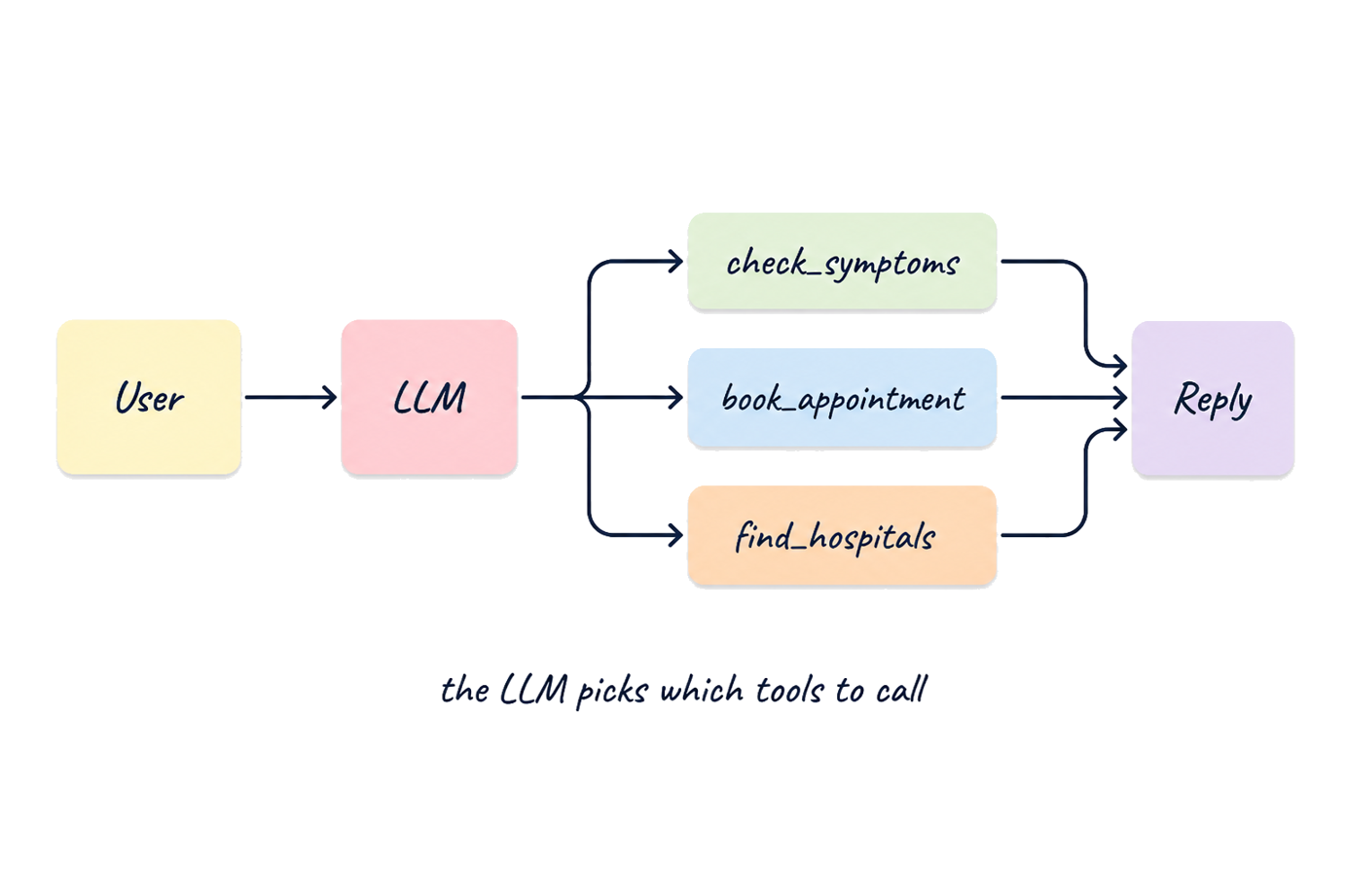
“I have fever and body ache, find hospitals near Mumbai” |
MediBot might call check_symptoms, then find_nearby_hospitals, then write a single friendly reply. I didn’t plan that sequence. The model did.
The part that took iteration wasn’t the C# – it was the tool descriptions and system prompt. Vague descriptions meant the model called the wrong plugin or skipped one entirely. I built Aria the same way (different plugin, different instructions, same pattern). Both went live at agentic-ai-yihx.onrender.com.
|
I stopped writing if/else. I started writing small methods and trusting the model to pick the right one. |
The question that ties them together |
Same language – “agent.” Same stack – .NET, Razor Pages, OpenRouter. Completely different answer to one question:
|
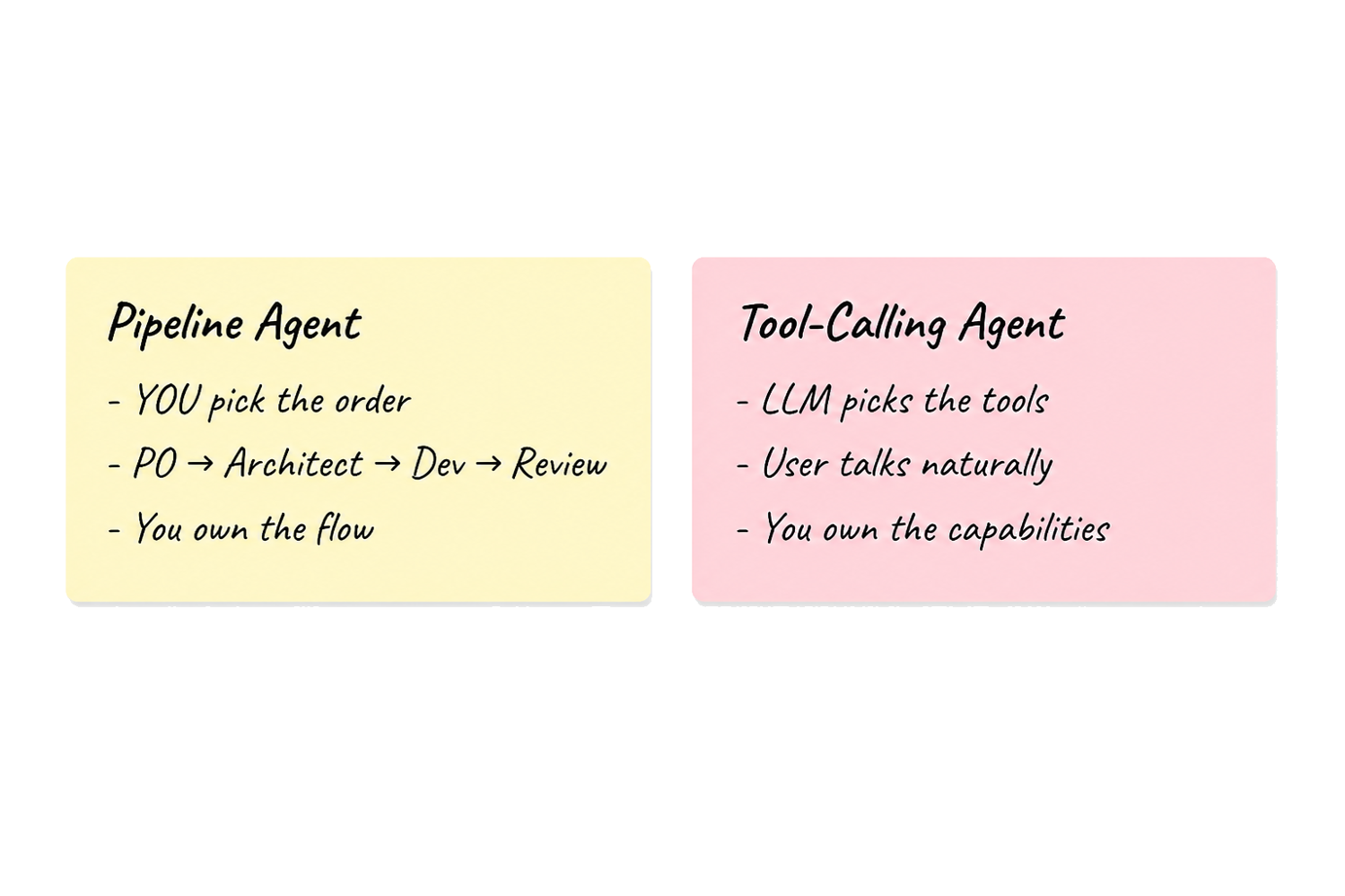
Who picks the next step? |
|
You pick PO → Architect → Developer → Reviewer. Every time. One class per role, one chain method, LLM behind an interface. Plain C# – no framework required. |
LLM picks Kernel + plugins with |
Neither is better. They answer different questions.
Your process has known stages → build a pipeline. You own the flow.
Your users bring unpredictable requests → build tool-calling agents. You own the capabilities.
What took me too long to accept: you have to choose upfront. You can’t bolt a pipeline onto a chatbot or vice versa without rethinking who holds the baton.
What I’d build next (honestly)
I haven’t shipped a third app yet. If I did, it would probably mix both patterns – a fixed outer flow (intake, draft, review) with tool-calling inside each stage, so the model has room to move but can’t skip a human approval before something important goes out.
For now, the lesson from two live demos is simpler: pick who owns the next step on day one. Everything else – SK vs plain C#, OpenRouter vs something else – is easier once that’s clear.
If you’re starting today |
Pick your side of the question first. Then the code almost writes itself.
|
Pipeline path Sketch stages on paper. One agent class per stage. One method that chains outputs. Add SignalR if you want users to watch progress light up. |
Tool-calling path List what your app can do. Turn each into a C# method with a clear description. Spend time on the system prompt – it shapes behaviour more than anything else. |
|
See it live Pipeline: pipeline-based-multiagent-ai-6w7n.onrender.com Type “Build a habit tracker for developers” – watch four agents chain. Tool-calling: agentic-ai-yihx.onrender.com Ask MediBot about symptoms, or tell Aria to set a reminder. |
|
I built the pipeline first because I wanted control. I built the SK agents second because I needed to let go. The best agent you’ll write is the one where you know – clearly – who’s picking the next step. |